How to Turn Live Translation and Captions Into Event Sponsorship Revenue
.avif)
.avif)
A silent disco is an event format where audio is sent directly to each listener instead of being played through room speakers, so attendees hear the presenter through headphones while the room itself stays quiet. At some events or conferences, the same format is called silent theater, silent conference, silent seminar, silent conference, or floor audio, and it lets planners run multiple stages and breakout sessions in one open space without sound bleed. This includes education sessions and booth presentations.
Traditional silent disco rental is priced per headphone per day, so the cost climbs with every attendee, before shipping, staffing, and sanitizing are added. You also need to rent one transmitter for each stage. Wordly Silent Theater delivers the same outcome without rental equipment: attendees scan a QR code and listen with their own device and headphones, with live translation and captions available in dozens of languages.
Table of Contents:
- What is Sponsor Logos?
- Where Do Sponsor Logos Appear?
- Can You Sell a Different Sponsor for Each Room?
- How Do You Fund Translation and Captions When There is No Budget?
- What Are Your Options for Sponsor Visibility on Captions Today?
- Why This Works Now
- Frequently Asked Questions
- Getting Started with Sponsor Logos
What is a Sponsor Logos?
Sponsor Logos is an add-on to your existing Wordly account, not a separate tool or a second system for your team to manage. If you already run Wordly for live translation and captions, it layers a sponsor's brand into the feed you are already producing.
The important distinction is that the logo is part of the caption experience rather than an ad wrapped around it. There is no ad break or pop-up between speakers.The sponsor's brand sits with the text attendees are following, which means it is present for the full length of a session instead of flashing up for a few seconds and disappearing.
It also scales with your program rather than your production effort. Whether you are covering one keynote or every room on the schedule, the placement travels with the Wordly feed, so adding it to more sessions does not add work for your AV team or your session hosts. Your event runs exactly as it would otherwise.
Sponsor Logos is priced as an add-on based on the size of your events, and your Wordly representative enables it on your account and configures it for the sessions you want it on.
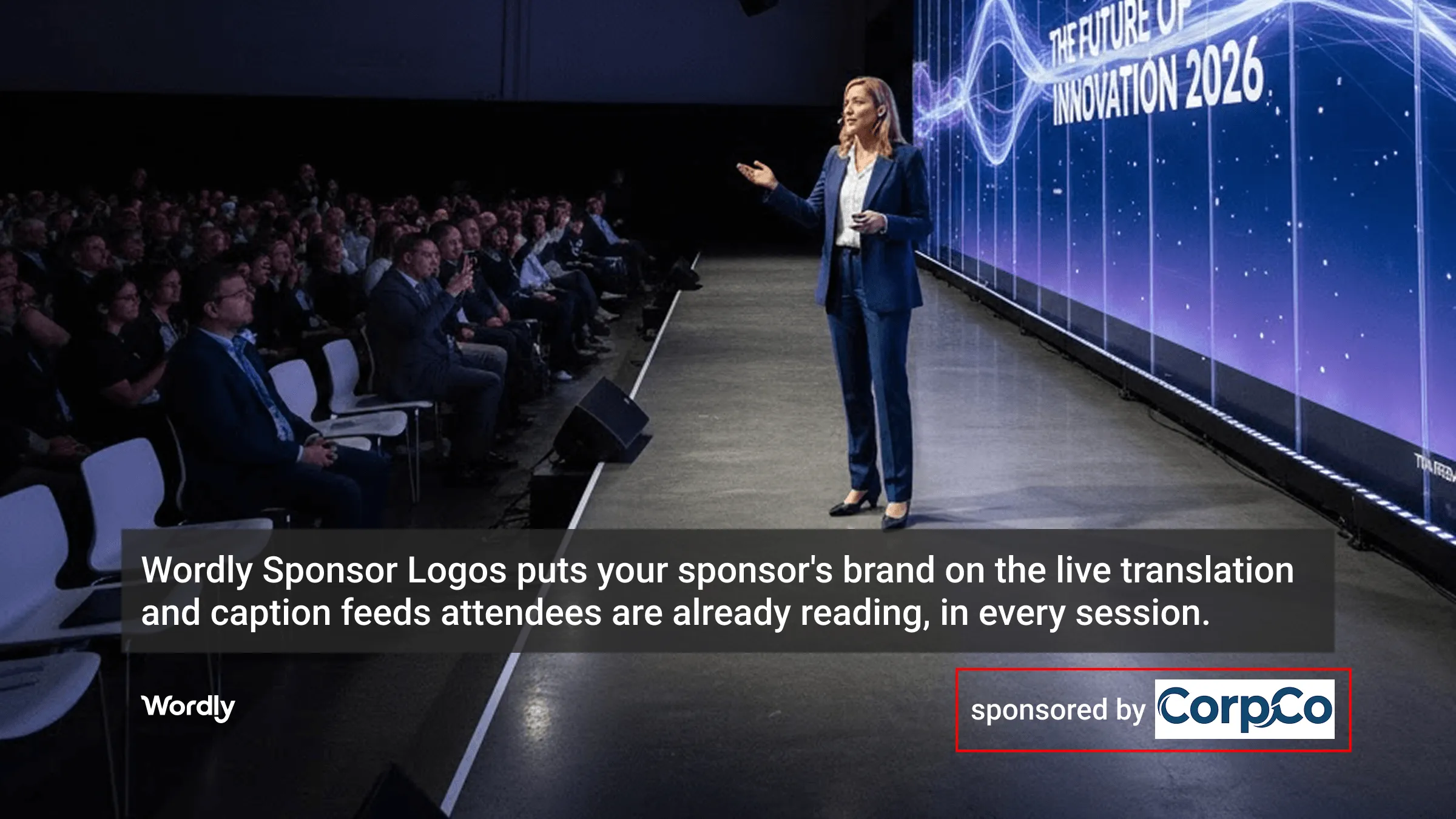
Partner logo on the main stage screen.
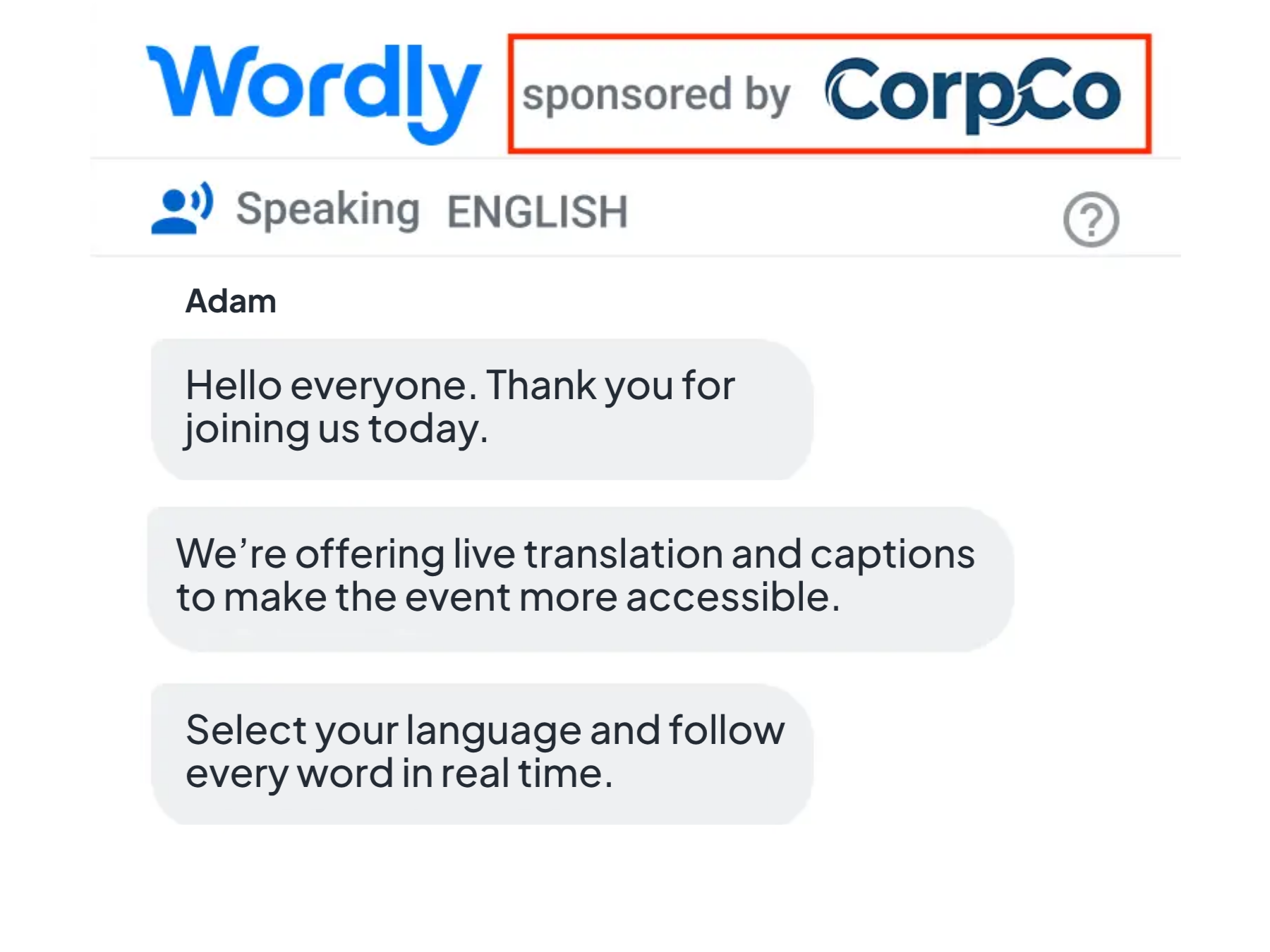
Partner logo on a phone.
Where Do the Sponsor Logos Appear?
Sponsor logos show up wherever your attendees follow along:
- Attendee phones: Anyone reading captions or translated text on their own device sees the sponsor's brand in the same view.
- Room monitors: Side screens and confidence monitors displaying the caption feed carry the logo.
- Main stage displays: Translated subtitles projected on the big screen include the sponsor placement.
Because the logo travels with the feed rather than with a single language, brand presence stays consistent no matter which language an attendee has selected. A sponsor buying the placement reaches your English-speaking audience and your multilingual audience with the same impression.
Can You Sell a Different Sponsor for Each Room?
Yes, you can assign a unique logo to each stage, room, or session.
A single-track event has one placement to sell. A conference with five breakout rooms running concurrent sessions has five, plus the main stage. If your event runs three days, that multiplies again. Instead of one new sponsorship line item, you have a tier of them, and they can be priced by session attendance the same way you price other placements.
How Do You Fund Translation and Captions When There Is No Budget?
This is the question most organizers are actually asking. Live translation and captions make events measurably more accessible and engaging, and for many organizations they are a compliance requirement rather than a nice-to-have. But when the budget conversation happens, language access is often the line that gets cut, or gets limited to the keynote only while breakout sessions go without.
Sponsor Logos flips the accounting. A cost center becomes a sellable asset. Organizers who sell the placement can offset the cost of language access, and in many cases come out ahead. That changes which sessions you can afford to cover. Rather than translating the main stage and nothing else, you can extend coverage across the whole program because each room is carrying its own sponsor.
It is worth noting how much value is already on the table here. Event organizers have saved more than $200 million by moving from traditional interpretation to Wordly. Sponsor Logos takes the remaining cost and gives you a way to fund it.
What Are Your Options for Sponsor Visibility on Captions Today?
There are three approaches organizers take:
1. Do nothing: The default. It costs nothing to set up, and one of the most-viewed screens at your event generates nothing.
2. Swap in your own logo: Some vendors let you replace their branding with yours. That helps your event identity, but it is one fixed logo. You cannot resell it, and you cannot rotate it by session.
3. Use Wordly Sponsor Logos (Best Option): A partner's logo appears on the live translation and captions feed across displays and attendee phones, in every language, assignable by room or session. It is inventory you can sell alongside every other placement in your package.
Why This Works Now
Demand for live AI translation and captions at events keeps climbing. Wordly has passed 1 billion minutes of live multilingual translation and 6 million users across 120+ countries, with significant sales growth over three years. In 2026 Wordly was named to the Inc. 5000 for the second consecutive year, ranking #521 overall and 52nd among software companies.
That growth means the translation and caption feed is no longer a niche accessibility tool used by a handful of attendees. At a multilingual event it is a primary way people consume the content, which is precisely what makes it worth something to a sponsor.
See how Wordly works for in-person meetings and events in this video.
Frequently Asked Questions
What is Sponsor Logos?
Sponsor Logos is a Wordly add-on that places a sponsor's brand on the live translation and caption feeds attendees are already reading, on room and stage displays and on every phone in the audience. It turns a service you already use into a placement you can sell, with no change to how you manage sessions.
Where do sponsor logos appear during a session?
On attendee phones, on room monitors, and on the main stage screen. The logo stays in view for the length of the session, in whatever language each attendee has selected.
Can I show different sponsors in different rooms or sessions?
Yes. You can assign a unique logo to each stage, room, or session, which lets you sell placements to multiple partners across a single event.
Does Sponsor Logos change how my sessions run?
No. It fits into your existing Wordly workflow, so your team activates a sponsorship without adding setup work or changing session delivery.
Who typically buys this placement?
Partners who want sustained visibility rather than a single impression, and sponsors with accessibility or inclusion commitments they want to demonstrate. It also appeals to sponsors who were shut out of your sold-out inventory.
How do I turn on Sponsor Logos?
Sponsor Logos is an add-on to your Wordly account. Contact your Wordly representative to have it enabled for your events.
Getting Started with Sponsor Logos
Sponsor Logos is an add-on to your Wordly account, priced based on the size of your events. Contact your Wordly representative to have it enabled, or book a demo to see how the placement looks on stage displays and attendee phones.
You can also see the full feature details on the Sponsor Logos page.


.png)
